Anniversary Video Ideas From Photos
Published 2026-10-22
Want to skip straight to it? Use the AI Romantic Video Maker — two photos, a few minutes.
Anniversary Video Ideas From Photos: Where to Start
Most anniversary video ideas assume you already have footage: clips from trips, a wedding video, years of phone recordings. Many couples do not. They have photos, often hundreds of them, but very little video of the two of them together. This guide collects anniversary video ideas that start from photos, from the simple slideshow you can make in any editor to a short AI clip made from just two pictures.
None of these ideas needs special equipment. Some need an afternoon, some need a few minutes. Pick the one that fits the person you are making it for and where you plan to share it.
A quick note on the examples on this page: every face in our example images is AI-generated. We do not show real customers or their videos.

Idea 1: A Short AI Anniversary Clip From Two Photos
If you want something that looks like a video of the two of you, not a slideshow, an AI template is the quickest route. You upload one clear photo of each person, and the AI places you both in one scene and animates it. On ReelCrew every clip is 12 seconds long, vertical (1080×1920) and comes with sound, which makes it easy to post as a TikTok, Reel or Short or to send in a chat.
For an anniversary, these templates fit best. The AI Romantic template turns two photos into a slow, romantic scene such as a dance or an evening walk. The AI Kiss template makes a gentle kiss clip. The AI Hug template makes a warm hug that is easy to share publicly, for example with family. The AI Couple template shows the two of you side by side, hugging and laughing.
The photos do not need to be taken together. One photo of each of you is enough, and each should show one person with the face clearly visible. Our anniversary video from photos page lists these templates in one place.
Idea 2: A “How We Started” Photo Timeline
A timeline is the classic anniversary video idea for a reason: it tells your story in order. Choose one photo from each stage, such as the first photo you have together, your first trip, a move, a wedding or a new pet, and put them in date order. Ten to twenty photos is usually enough; more than that and the video starts to drag.
Keep each photo on screen for two to three seconds. Add a short caption with the place or year if it helps, and finish on a recent photo. Free editors on your phone can do this with a few taps. If you want, end the timeline with a short AI clip of the two of you made from two recent photos, so the story closes on movement instead of a still image.
Idea 3: Then and Now
Put an old photo and a recent photo side by side, or one after the other. It works for any milestone, from a first anniversary to a twenty-fifth. The simplest version is two photos taken in the same place, years apart. If you do not have a matching pair, a photo from your first year and a photo from this year still makes the point.
You can also use one photo from each of you from before you met. It is a playful way to show how far you have come, and it usually gets a reaction.
Idea 4: Recreate Your First Date or First Photo
Go back to the place where you met or had your first date, and take a new photo in the same spot and pose. Pair it with the original. If you cannot travel there, recreate the pose at home with similar clothes. This idea takes some planning, but it creates a new memory at the same time as the video.
Idea 5: Messages From Friends and Family
Ask a few friends or family members to send a short voice note or a line of text about the two of you. Combine them with photos from the years they mention. For larger anniversaries, such as a tenth or a twenty-fifth, this is often the part people remember most. Collect the messages a week or two ahead so you are not rushing.
Idea 6: A Song and a Photo Per Line
Pick a song that matters to you, such as the first dance or the song from your first road trip, and match one photo to each line of the chorus. The music sets the pace, so you do not need to think about timing. Check the music rules of the platform you post on; TikTok and Instagram let you choose from their own music libraries when you post.
If you make an AI clip on ReelCrew, it already has sound. If you want your own song instead, add it in the app when you post and turn the original sound down.
Idea 7: Long-Distance Anniversary
If you are spending the anniversary apart, a video can stand in for the photo you could not take together. Upload one photo from each of you, even if they were taken in different cities, and an AI couple or hug template puts you in one scene. Send it on the day, or post it as part of a countdown to your next visit. Our long distance relationship video page covers this in more detail.
How to Choose Photos for an Anniversary Video
Whatever idea you choose, the photos decide how good the result looks. For slideshows, use the sharpest version of each photo you can find. Photos saved from chat apps are often compressed, so look for the original in your phone gallery or cloud backup.
For an AI clip the rules are stricter, because the AI needs to see each face clearly. Use one person per photo, face visible and roughly facing the camera, in good, even light. Avoid sunglasses, masks, heavy filters and group photos. Photos with similar light and angle for both of you give the most natural pair. And only upload photos of people who have agreed to it, including your partner if the video is a surprise for someone else.
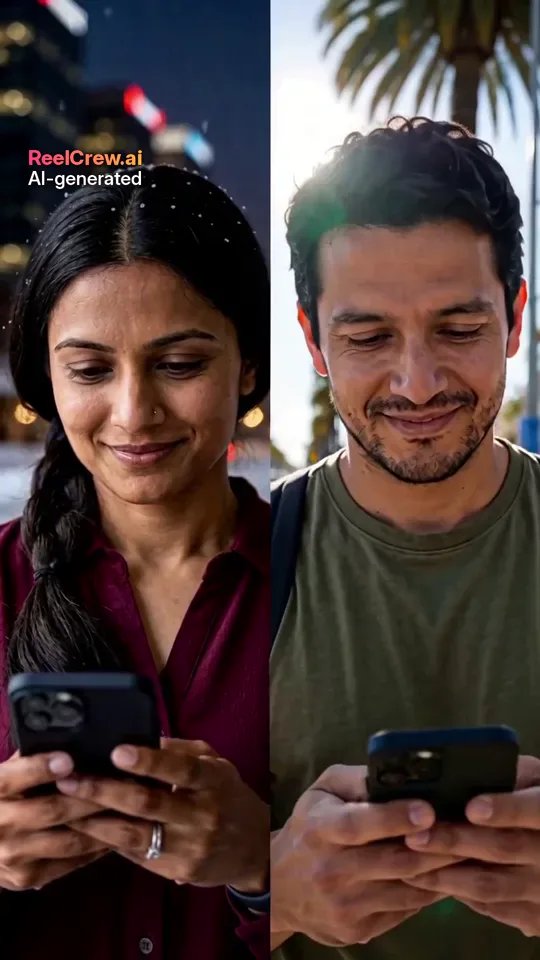
How to Make an AI Anniversary Video on ReelCrew
Choose a template, such as AI Romantic, AI Kiss, AI Hug or AI Couple. Upload one photo of you and one of your partner, confirm you have permission, and press Generate. Most videos are ready in a few minutes, and you can follow the progress on the result page.
Sign in with Google to claim a free daily credit. One credit makes a complete preview of your video at 540×960 with a watermark, so you can check it before paying anything. If you like it, you pay once to download the full-quality 1080×1920 file without the preview watermark; current prices are on the pricing page. A small “AI-generated” label stays on every video.
The video has no on-screen text. Add the date, your caption or a line from your first message in TikTok or Instagram when you post, or in a chat when you send it.
Where to Share It
A vertical 12-second clip fits TikTok, Instagram Reels, YouTube Shorts and Stories without cropping. For a private message, send the file directly in WhatsApp or iMessage. If the video is for a party, check that the screen can show vertical video, or play it from a phone.
If you post publicly, think about who will see it. A hug clip is easy to share with family; a kiss clip may be better for your partner alone.
A Few Things to Keep in Mind
AI video is not a recording of something that happened, and it may not look exactly like you. The scene is generated; the faces follow your photos. That is why it works best as a playful or sweet extra, not as a replacement for real photos from your relationship.
If something does not look right, try a different photo first: a sharper, front-facing photo usually helps more than anything else.