How to Do the “My Ride Is Here” Trend with AI
Published 2026-10-20
Main guide: What the My Ride Is Here trend is and where it started. This page covers only the step-by-step how-to.
Want to skip straight to it? Use the My Ride Is Here AI Flying Broom Video — one photo, a few minutes.
My Ride Is Here AI Tutorial: What You Need
Start with our main page on the trend — the My Ride Is Here trend page — for where it came from and what the original clips look like. This My Ride Is Here AI tutorial only covers the how-to.
For the AI version you need just one photo of yourself standing upright, a phone or computer and a few minutes. You do not need a broom, a costume, a green screen or any editing app: the template supplies the broom, the sky and the flight, and the finished clip is 12 seconds, vertical 9:16 at 1080×1920, ready for TikTok, Reels and Shorts.
How the AI Version of the Trend Works
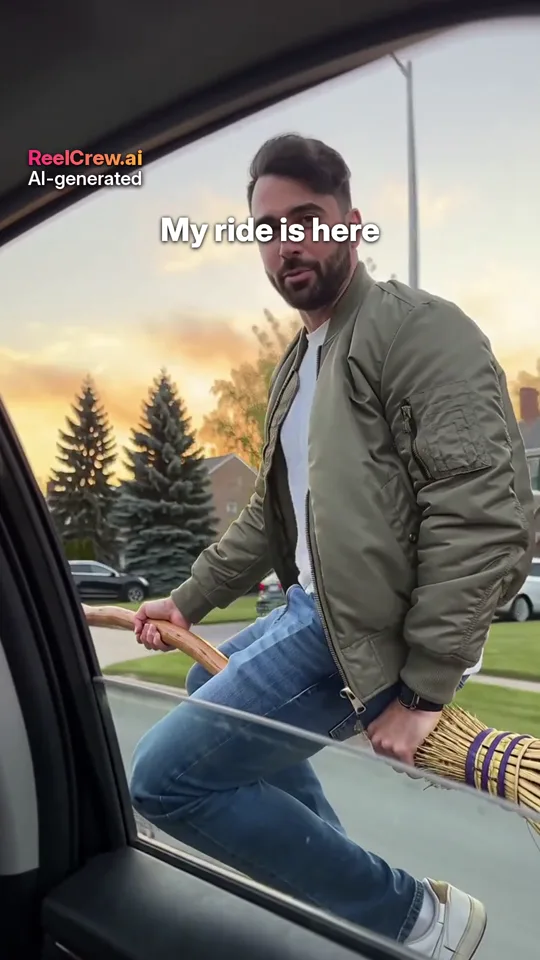
In the original clips people film a friend “arriving” in an unexpected way and caption it “my ride is here”. The AI version keeps that structure but takes the filming out of your hands: the template already contains the camera move, the setting, the broom and the timing, written as instructions for a video model. Your photo tells the model who should be on the broom.
That is why one photo is enough, and why the photo matters so much. The model keeps your face, hair, build and clothes as close as it can to the photo, then builds the rest of the scene around you. It does not copy any creator’s original clip; it generates a new 12-second video every time, so two runs with the same photo can differ slightly.
The music is added afterwards and is licensed for use within the video only. Many people prefer to post with the trend’s original sound in TikTok instead, which is fine — mute or lower the clip’s own music in the TikTok editor.
Step 1: Choose the Right My Ride Is Here Template
ReelCrew has two broom templates, and they suit different versions of the joke.
My Ride Is Here broom: the classic. The shot is filmed from a car window at dusk; you float up beside the car on a broom, give the lens a deadpan look and fly off. Pick this one if you want the punchline of the trend — the ride has arrived — to land on you.
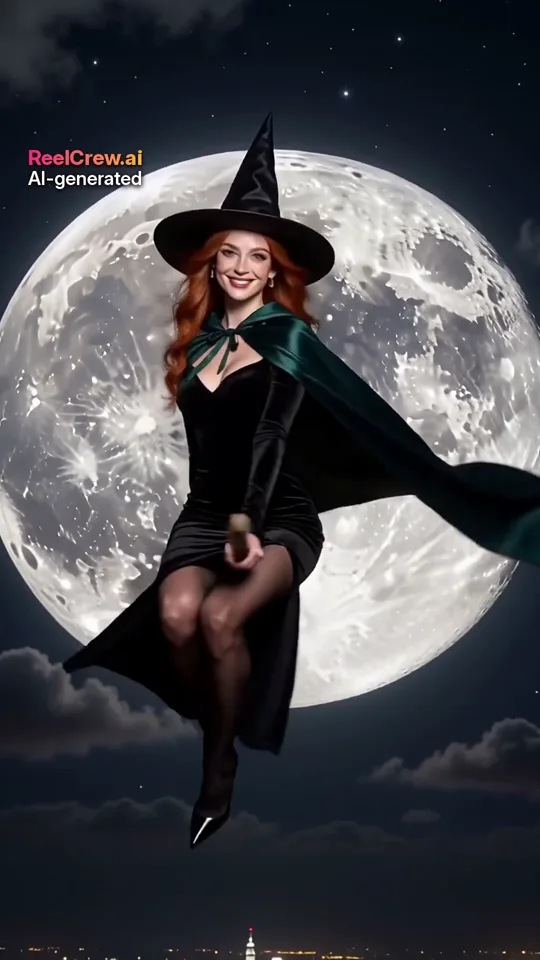
Ramalama broom moon reveal: a phone films the full moon, a tiny witch silhouette crosses it, the shutter snaps and the next shot shows you on the broom in front of the moon, timed to the beat. Pick this one if you want a spookier, more cinematic reveal for Halloween.
Both are one-photo templates, so you can try one and switch to the other later with the same photo.
Step 2: Take a Photo That Works
Because the template places your whole body on the broom, the photo must show you from head to shoes. Ask a friend to take it from a few steps away, or use a timer with the phone at waist height.
Stand upright with your arms relaxed, facing the camera. A plain background — a wall, a door, an empty corridor — makes it easier for the model to separate you from the scene. Daylight or a bright room is best; avoid a single strong lamp to one side.
Wear something with a clear outline. Long coats and wide bags are fine, but they can change how you sit on the broom. One adult only in the photo: crop out anyone else, and never use a photo of a child.
What to avoid: photos cropped at the knees or waist, mirror selfies where the phone hides your face, heavy filters and sunglasses. If the broom ends up in an odd place in the preview, a photo taken from further away usually fixes it.
Step 3: Upload and Generate the AI Video
Open the template page and drop your photo into the upload box. Tick the consent box to confirm that the photo is of you, or that you have permission from the person in it, and that everyone shown is an adult. Then press Generate.
Generation runs in the background with a progress bar and most videos are ready in a few minutes. If you are signed in with Google you can use your free daily credit for one watermarked preview a day. If you like the preview, a one-time payment unlocks the full-quality file without the preview watermark.
Check the preview for three things: does the broom sit naturally under you, is your face recognisable when you look into the lens, and does the timing feel right? If the first two fail, change the photo rather than generating again with the same one.
Step 4: Post Your My Ride Is Here Video
Download the file with the download button rather than screen-recording it, then upload it straight to TikTok, Reels or Shorts. The clip is already 9:16, so it needs no cropping.
The joke of the trend is the moment the ride arrives. Use the trend’s original sound inside TikTok and keep your caption to the punchline, for example “my ride is here”. If a friend has already posted their version, a duet or stitch puts the two rides side by side.
Every ReelCrew video carries a small visible “AI-generated” label. Leave it in place; many platforms also ask you to mark AI-generated content when you post.
Troubleshooting Your AI My Ride Is Here Video
The broom is in a strange place. This almost always means the photo was cropped or taken too close. Retake it from further away so your shoes and some floor are visible, and stand straight rather than leaning on something.
My face does not look like me. Use a photo where your face is clearly visible and evenly lit, without sunglasses or a hat that shades your eyes. A full-body photo makes the face small, so make sure the original file is sharp: zoom in and check that you can see your eyes clearly. Our guide to why an AI face looks unnatural goes through the fixes in detail.
The background looks busy. A cluttered room in the photo does not appear in the final video, but it can make it harder for the model to read your outline. A plain wall or door behind you gives the cleanest result.
The upload is rejected. Photos are checked automatically before generation. A photo is rejected if anyone in it may be under 18, if it matches a public figure, or if it fails the content check. Use a photo of yourself, as an adult, on your own.
Free Preview or Full-Quality File?
With Google sign-in you get one free daily credit, which makes one watermarked preview at 540×960. That is enough to check whether your photo works and whether you like the joke. For posting, the full-quality file is 1080×1920 without the preview watermark, for a one-time $9.99 (or $19.99 for three videos, if you want both broom versions and one more).
A sensible order: make the free preview with your best photo, check it on your phone, and only pay once you are happy with the result.
Ideas to Make Your Version Stand Out
Set up the joke before the clip: film a few seconds of yourself waiting at a bus stop or looking at your phone, then cut to the AI video as your ride arrives. Post the broom and the moon version on consecutive days with the same photo so viewers recognise you. Or make it a group joke: each friend makes their own clip from their own photo, with their permission, and you post them as a series.
Keep it kind. The trend works because it is light-hearted; do not use someone else’s photo without asking, and never use photos of public figures.