Video From Santa: A Personalized AI Santa Video Guide
Published 2026-10-22
Want to skip straight to it? Use the Personalized Santa Video: An AI Santa Visit From Your Photo — one photo, a few minutes.
What a Video From Santa Usually Means
Every December people look for a video from Santa. For most families that means a recorded message where Santa talks to a child, says their name and maybe mentions a gift. For adults it often means something lighter: a funny festive clip for a story, a card that moves, or a surprise to send to friends and family.
This guide covers both, and is honest about which one ReelCrew makes. ReelCrew makes a personalized Santa video for adults: an AI Santa video where you appear in a short Christmas scene with a generic Santa. It is not a talking message for a child. Every face in the example images on this page is AI-generated, and no real customers are shown.
What the ReelCrew Personalized Santa Video Shows
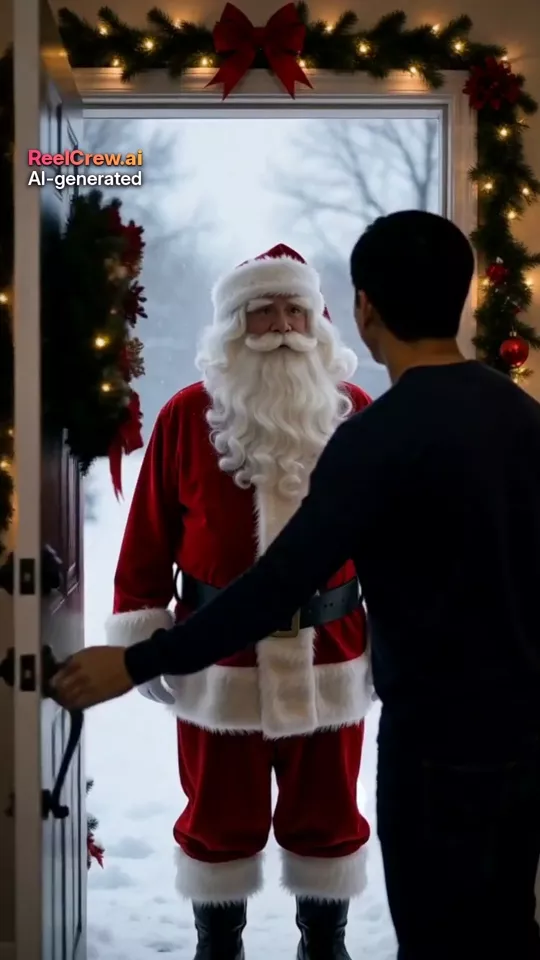
You upload one photo of yourself. The AI makes a 12-second vertical clip, 1080×1920, with sound. In the scene there is a knock at the door on a snowy evening, you open it and look surprised to see Santa, Santa hands you a gift wrapped in plain red paper by the Christmas tree, and you open it, laugh and give Santa a hug.
Santa is a classic, generic character: a white beard, a red suit with white fur trim and a black belt. There are no logos, no brand marks and no characters from films. Your face follows the photo you upload and you keep your own everyday clothes. The result may not look exactly like you, because it is generated, not filmed.
Santa does not speak and there is no on-screen text, so the video will not say your name or read out a message. That is a real limit, and it is the main difference from a talking Santa message. If you want words in it, add them yourself when you send or post it: a caption, a sticker or a voice note.
Each video carries a small “AI-generated” label. That is deliberate: a festive clip is more fun when nobody is fooled into thinking Santa really came round.
Personalized Santa Video vs a Talking Santa Message
A talking Santa message is usually made from a library of recorded or generated clips of Santa speaking, with a child’s name, age and a few details dropped in. It is aimed at children and parents, and it works because Santa talks directly to the child.
An AI Santa video from a photo works the other way round. Instead of Santa talking to the viewer, the person in the photo appears in the scene with Santa. That makes it a better fit for adults: a festive post, a joke for a group chat, or a surprise for a partner or a parent who will laugh at seeing you meet Santa.
ReelCrew only accepts photos of adults, so it cannot make a video of Santa visiting a child. If a child is the audience, a talking-message service built for that is the right tool. If you are the star, a personalized Santa video from your photo is the right tool.
Ideas for Your AI Santa Video
A festive story or Reel. Post the clip in early December with a caption such as “Guess who came round tonight”. It works without a costume, a photographer or a queue at a shopping centre grotto.
A moving Christmas card. Send the video instead of, or next to, a normal card. Write the message in the text of your chat or email, since the video itself has no words.
A surprise for family far away. Grandparents, parents and siblings who live in another city or country often enjoy a silly clip more than a long message. If you also want a clip of the two of you together, see the long distance relationship video page.
A Secret Santa reveal. Use the clip to announce who drew whom, or as a light joke in a work or friends group. Ask before you post a video of anyone else, and only use your own photo for the Santa clip.
A countdown post. Pair it with a caption counting down the days to Christmas, or post it on Christmas Eve as a reply to friends asking what you are up to.
How to Make a Personalized Santa Video, Step by Step
Step 1: Choose one good photo of yourself. One adult only, face clearly visible and roughly facing the camera, in good even light. Chest-up or half-body works best. Avoid sunglasses, masks, heavy filters and group photos.
Step 2: Open the Santa Visit template and upload the photo. You need to sign in with Google first.
Step 3: Press Generate and wait. The clip takes a few minutes. You can claim a free daily credit for a watermarked preview to check the face and the scene before you pay for anything.
Step 4: Check the preview. Look at the face, the hands and the gift. If you do not like it, try another photo with clearer light; the photo is the thing that changes the result most.
Step 5: Download the full-quality 1080×1920 file if you want it without the watermark, then send it or post it with your own caption. Current options are on the pricing page.
Photo Tips for a Better AI Santa Video
Light matters most. A photo taken facing a window in daylight gives the AI a clear face to follow. Dark photos, strong shadows and coloured party lights make the face less stable.
Keep the face large in the frame. A selfie or a chest-up photo works better than a full-length photo where the face is small.
Wear what you would wear at home. The video keeps your own clothes, so a jumper or a shirt looks natural next to a Christmas tree. A Christmas jumper in your photo will carry over and can look fun.
Use a recent photo of yourself, and only of yourself. Do not upload photos of other people, celebrities or children. ReelCrew only accepts photos of adults, and you should only upload a photo you have the right to use.
What a Personalized Santa Video Cannot Do
Honest limits save time. The ReelCrew Santa clip does not say your name, read a message or show text. It does not include children, other family members or pets. It cannot use a brand’s Santa, a film Santa or a shopping-centre character. The scene is the same each time: the doorstep, the tree, the gift and the hug, while your face and clothes come from your photo.
The video is 12 seconds, vertical 9:16, with sound. That suits stories, Reels, Shorts and chat apps. It is not a long greeting or a film.
Is an AI Santa Video Safe to Make and Share?
You only upload one photo of yourself. The video has a visible “AI-generated” label, which keeps it honest when people share it on. If you post it, say it was made with AI if anyone asks, and do not use it to pretend to be someone else.
Never upload a photo of someone else without their clear permission, and never of a child. If you see a ReelCrew video that misuses your face, you can report it on the report page.
Other Festive Videos From Photos
If you want a clip of two people rather than you and Santa, the AI Hug and AI Couple templates take one photo of each person and make a warm hug or a side-by-side couple scene, also 12 seconds with sound. They suit a Christmas message to a partner or a friend.
For a birthday in December, see the birthday video from photos page. For couples who spend the holidays apart, see the long distance relationship video page.