My Movie Scene: Turn Your Photo Into a Film Clip
Upload one photo and the AI casts you as the lead in your own movie moment: a widescreen-style shot with moody light, a slow camera push-in and film grain, like a scene from a film. 12 seconds, 1080×1920, with sound.
Last updated:
Consent box required before every video · photos deleted when your video finishes (unused uploads within about 1 day) · reported videos removed within 48 hours. Safety rules
1 free preview with Google sign-in · first video $4.99 (one per account), then $9.99 for 1, $19.99 for 3 or $49.99 for 10 · no subscription required · ready in a few minutes
What You Get
- 12 secondsA finished clip, not a few seconds of motion.
- Vertical 1080×1920Ready for TikTok, Reels and Shorts without cropping.
- Soundtrack includedThe video comes with its soundtrack already added.
- No prompt writingPick a template and upload your photo(s); the scene is already written.
What you get
- A 12-second vertical video (1080×1920, with sound), ready to post on TikTok, Reels and Shorts.
- No watermark once you pay. A small "AI-generated" tag stays so viewers know it's AI.
- Use it anywhere, personal or commercial. The music is cleared for use in this video.
- Download the MP4 or share a private link.
- Your photos are deleted as soon as your video is ready, and videos are auto-deleted after 30 days, for your privacy.
- Your first HD video is $4.99, then $9.99 each. You pay once, with no subscription. If we can't deliver, you get your money back.
Not included
- The AI tag can't be removed. It keeps your post compliant on social platforms.
- The music can't be used on its own. It's licensed for your video only.
- No editor or prompt box. Each template is pre-tuned, so you only upload a photo.
- Results follow your photo's style. Faces and motion are AI-generated, so small details may vary.
- The free preview is watermarked and lower resolution, one per person, so you can try it before paying.
One free preview: sign up with Google and see your own 12-second video first, as a watermarked 540×960 preview — no card needed, one per person. If you like it, unlock the full-quality, watermark-free version from $4.99. See pricing.
My Movie Scene: Turn Your Photo Into a Film Clip Examples
How to Make Your Movie Scene Video
- Upload one clear photo of yourself, face visible, waist up or closer.
- Keep the My Movie Scene template selected and press Generate.
- Download the clip and post it with your "my movie scene" collage. Sign in with Google and you get 1 free preview (watermarked, one per person), or pay once for the full-quality 1080×1920 file.
My Movie Scene Video Specs
- Input: 1 photo (one adult).
- Output: one 12-second MP4, vertical 9:16, 1080×1920 pixels.
- Sound: Soundtrack included, built in. No prompt or editing needed.
Platform rules: TikTok asks for uploads of 720×1280 or higher; YouTube Shorts take up to 1080p, 9:16 vertical, and up to three minutes; Instagram Reels accept aspect ratios from 1.91:1 to 9:16. The clip fits all three. Quotes and dates: homepage.
Your Own Movie Moment
In the "my movie scene" trend, people picture the film scene that feels most like them and share it. This template turns that idea into a moving clip: from one photo, the AI makes a short cinematic shot with you as the lead.
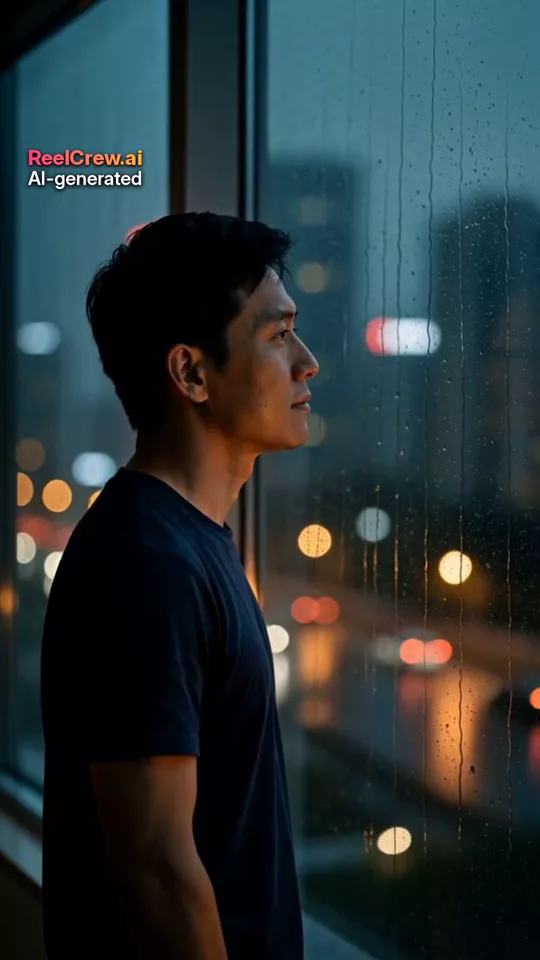
The scene is a quiet, moody moment — a window at dusk, rain on the glass, a slow camera push-in, film grain and a soft score — so it works as a "main character" clip on its own or next to your collage.
The AI follows your face from the photo, but the result may not look exactly like you, and because every clip is generated, the camera move, the light and the expression vary from video to video. It is an original scene, not footage from any real film.
Every video is 12 seconds, vertical 9:16 at 1080×1920, with a small “AI-generated” label under the ReelCrew.ai name in the top-left corner.
Best Photos to Use
Works best
- One adult only, face clearly visible
- A waist-up or head-and-shoulders photo in good light
- Plain or uncluttered background
Avoid
- Group photos
- Sunglasses or masks that hide the face
- Photos of minors, celebrities or anyone without consent
Perfect For
- The "my movie scene" trendA moving clip to go with the movie scene, character and quote you picked.
- Profile and story postsA cinematic "main character" moment from an ordinary photo.
Safe Payment and Refunds
- Secure Stripe checkout; Apple Pay works on supported Apple devices. We never see your card number.
- A paid video that can’t be delivered is refunded automatically.
- Not happy? Email support@reelcrew.ai within 14 days of purchase; other refunds are at our discretion.
Full rules: refunds in our terms.
FAQ
How many photos do I need?
One clear photo of one adult. The AI builds the whole scene from it.
How long is the video?
12 seconds, vertical 9:16, 1080×1920.
Does the video include sound?
Yes. It comes with a soft cinematic score and rain ambience. You can also add a trending sound when you post.
Can I pick a specific movie?
No. The template makes one original cinematic scene; it does not copy real films, actors or characters.
Can I use a photo of my child?
No. Upload photos of adults only, of yourself or of someone who agreed to it. Photos of minors are not allowed.
Can I use just one photo?
Yes. This template needs exactly one photo of one adult.
Can I use two photos taken separately?
This template uses a single photo, so there is nothing to combine.
Can I use a pet or an anime character?
No. Our upload check requires a real adult with a clearly visible face for this template, so a photo of only a pet or a cartoon is rejected.
How do I choose good photos?
One adult only, face clearly visible. A waist-up or head-and-shoulders photo in good light. Plain or uncluttered background. Avoid group photos, sunglasses or masks that hide the face, photos of minors, celebrities or anyone without consent.
What happens to my photos?
Your photos are only used to make your video. They are deleted as soon as generation finishes (or within about a day if you never generate), and videos are deleted after 30 days. Nothing appears in the gallery unless you opt in. Our Safety page and privacy policy (linked below) have the details.
What can I do for free?
Once. Sign in with Google and you get 1 free preview: a watermarked 540×960 preview of your 12-second video, one per person. No card is needed. After that, full-quality videos cost first video $4.99 (one per account), then $9.99 for one, $19.99 for three or $49.99 for ten. On busy days the free previews can run out — you can still pay to generate.
More questions? Read Is It Safe to Upload Your Photo to an AI Video App? and Why Is My AI Video Blurry? How to Fix It, or see our safety rules.
Guides
Related Templates
- Retro Photobooth Strip Video From One SelfieUpload one selfie and the AI sits you in an old-school photobooth: a red curtain, a bright flash, a new pose with every click, and the four frames end up on a printed strip.
- AI Romantic Video MakerTurn two photos into a short romantic movie scene — a slow dance, a sunset walk, a quiet look.
- Personalized Santa Video: An AI Santa Visit From Your PhotoUpload one photo of yourself and the AI makes a short Santa visit: a knock at the door on a snowy night, Santa hands you a wrapped gift by the tree, and you both laugh.
See every style on the templates page, browse the gallery, or read how it works. Need a sound to post it with? See this week’s trending TikTok sounds.
Ready? One photo is all the My Movie Scene: Turn Your Photo Into a Film Clip video needs.
Upload your photos